Creating a custom dynamic stamp
Learn how to create your own custom dynamic stamp using Acrobat 8.

I’m often asked how to create a custom dynamic stamp by users who have noticed the dynamic stamp capability in Adobe Acrobat software. This tip reviews how to produce your own.
Note: Dynamic Stamps were first added in Acrobat 6. The instructions here are specifically for Acrobat 8, but most of the instructions are the same for earlier versions of Acrobat.
Note: The Text Field form tool is required, which means you must use Acrobat Professional to create a custom dynamic stamp.
Video Available
This tip is also available as a video.
Create your own dynamic stamp in Acrobat.
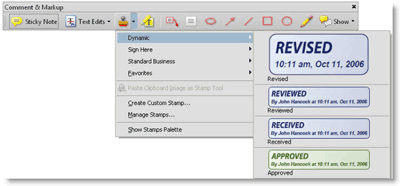
Figure 1. Using a dynamic stamp in Acrobat 8 Professional.
A dynamic stamp consists of the image of the stamp and a Text Form Field with JavaScript that creates the dynamic information (Figure 2).

Figure 2. A dynamic stamp consists of the PDF image and a Text Form field with JavaScript.
Your dynamic stamp can be stored in one of two locations for Acrobat 8 in Windows:
- [install directory]\plug_ins\Annotations\Stamps\[language] (see Figure 3)
- [user directory]\Application Data\Adobe\Acrobat\8.0\Stamps
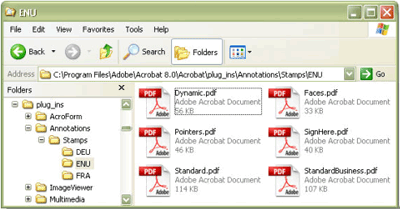
Figure 3. Location of the PDF containing the default dynamic stamps in WindowsXP
- For Acrobat 6, look in C:\Program Files\Adobe\Acrobat 6.0\Acrobat\plug_ins\Annotations\Stamps\ENU
- For Acrobat 7, look in C:\Program Files\Adobe\Acrobat 7.0\Acrobat\plug_ins\Annotations\Stamps\ENU
- On Mac OS X, search for “Acrobat User Data” and then drill down to the Stamps folder.
Steps to creating your own stamp
Step 1
Choose Comments > Comments & Markup Tools > Stamps > Create Custom Stamp.
Step 2
Select the file you want to be your custom stamp. The stamp can be in many file formats, including PDF, a graphic (*.tif, *.bmp, *.gif, *.jpg, *.png, *.pcx), a native Microsoft Office document (*.doc, *.xls, *.ppt), an AutoCAD® drawing, or an HTML page. To see all the possible formats you have available - select File > Create PDF > From File and check the Files of Type drop-down list.
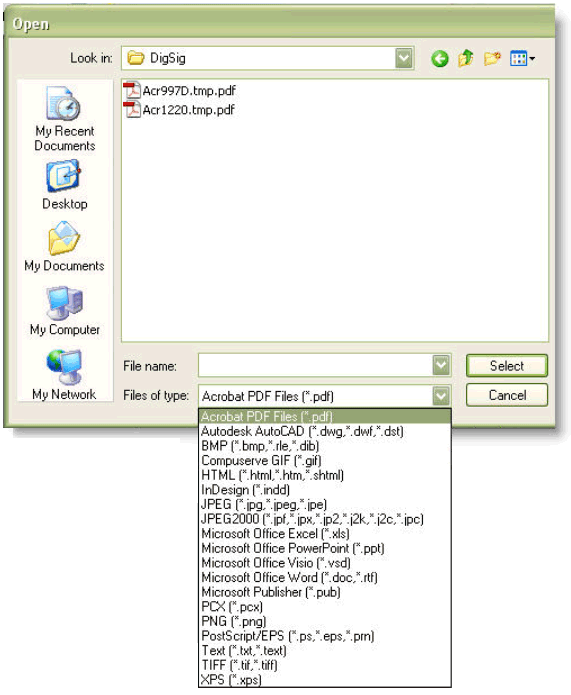
Figure 4: List of file formats that can automatically be converted to an Acrobat stamp
See larger image
Step 3
Create or choose a category and name your stamp. (See Figure 4).
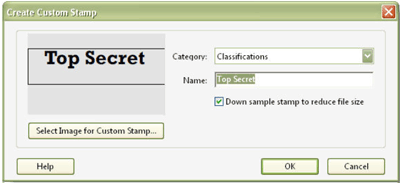
Figure 5. Custom stamp with a new category and name
When you select OK, your stamp is automatically created in the Application Data directory (c:\Documents and Settings\login name\Application Data\Adobe\Acrobat\8.0\Stamps). The actual name of the PDF stamp created will be generated by Acrobat. In this example, the file name is mkWXAu6ok-vDmYeXdpd4EB.pdf. (Note: you can rename this file if you want.) To determine which stamp is the one you just created, sort the stamps by date modified. The newest stamp is yours.
Step 4
Open Dynamic.pdf in the Acrobat 8\Acrobat\plug_ins\Annotations\Stamps\[language] folder and turn to the page containing the automatically-generated text you want, such as Revised on page 1.
Step 5
Choose the Text Field tool from Tools > Forms > Text Field tool. Select the text field on the stamp and copy it.
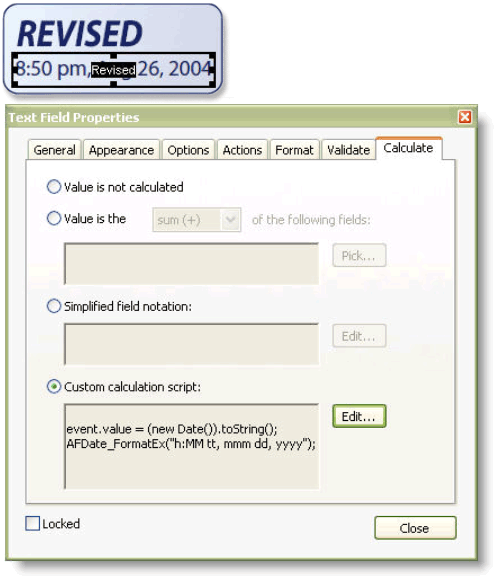
Figure 6. Form field in the default Revised dynamic stamp and its JavaScript
See larger image
Step 6
Open the PDF file containing your custom stamp and paste the text form field, which includes the JavaScript to display the dynamic information.
Step 7
Save the PDF file. You now have a dynamic custom stamp.

Figure 7. Final custom stamp
Related topics: |
Review and Comment |
Top Searches: |
Start a PDF review comment on your mobile device |
Try Acrobat DC
Get started >
Learn how to
edit PDF.
Ask the Community

Post, discuss and be part of the Acrobat community.
Join now >
22 comments
Comments for this tutorial are now closed.
Shane Doyle
5, 2016-03-08 08, 2016Does anyone have these instruction for a mac?
Lori Kassuba
6, 2015-12-07 07, 2015Hi Matt,
This answer explains how to add the identity as well:
https://answers.acrobatusers.com/Creating-custom-dynamic-stamp-user-name-q147684.aspx
Thanks,
Lori
Matt
9, 2015-12-02 02, 2015I can get the date to work - but how do I get the “by John Hancock” to show up?? The script provided above is only for the date
Lee
1, 2015-11-12 12, 2015Mary - The Application Data folder is often hidden. Have your IT dept make it visible and you should be able to go fully through the setup of the dynamic stamp. -Lee
Lori Kassuba
6, 2015-11-10 10, 2015Hi Fernando,
It’s not a built-in feature in Acrobat, unless they were using digital signatures but these aren’t stamps. Perhaps it way some sort of custom plugin that also flattened the document.
Thanks,
Lori
Fernando
10, 2015-11-04 04, 2015I have a coworker that recently joined our company. He mentioned that at his previous job he would use Acrobat to “stamp and seal” oficial documents by simply inserting the stamp which was size-locked and “sealing” the document by embedding the stamp in the document using a “seal” button on adobe. The date would show up as shown in this tutorial.
I have been trying to replicate this, but all I’ve found is stamping and signing which makes more sense to me since is a legal document but it does involve more steps; however, my coworker pointed out that it was a matter of 3-clicks to “stamp and seal” a document. Does this ring a bell to anybody?
Thanks.
Lori Kassuba
4, 2015-04-17 17, 2015Hi Benjamin,
Thanks for letting us know what worked for you. There is also an updated tutorial on this subject located here:
https://acrobatusers.com/tutorials/creating-a-custom-dynamic-stamp-infographic
Thanks,
Lori
Benjamin Noel
12, 2015-04-17 17, 2015To add more clarification to this super fun stamps game I’ve been trying to play for the better part of 2 or 3 days now, going to try to blurt this out quickly so I can get dinner.
Here is a solution to adding all the stamps you used to have into new Acrobat (as the whole “just copy the file into the Roaming Acrobat Stamps folder” didn’t do anything for me)
in Acrobat, create a new custom stamp, with whatever, this results in the crazy file name in the user stamp folder.
Take your old stamps file, rename it to this file name, (and put into the Title field of that acrobat properties the Name of the Stamps you’d like them to be contained under, this will be what shows up when you bring up the stamp tool.
And the whole dynamic stamp gobblygook above with the #crapblahsputting name, do away with that to make java and forms easier by opening page templates and just going through and making sure the pages in your file are accounted for and if you have the #crazyname then change it to something like #KISS=Keep it Simple Stupid (the Keep it Simple Stupid, will be what shows up if you were to show Stamp Names in Acrobat) and now when you try to do other Forms Java scripting you can just say event.source.stampName == “#KISS” and life will be easier
Also in the organize page menu drag the files around so they can be in a better order than just how you added them into Stamp originally.
You can drag in new files to this stamp file as well in the future too, just be sure to go to the page templates and get that page a name, #KISS2=Keep it Simple Squared
I hope this also saves someone the frustration of this Stamp world, I’m sure that now that I’ve FINALLY figured it out, Adobe will remove the feature.
Lori Kassuba
6, 2015-02-16 16, 2015Hi Karine,
You can do this by adding the words Purchasing Manager to the JavaScript that you’re using located under the Calculate tab of the Text Field Properties.
Thanks,
Lori
Karine
6, 2015-02-13 13, 2015Hi,
I know how to make the dynamic stamp for a signature with my name and date e.g. Karine, 13/02/2015
but how to add my position in the dynamic stamp? What is the script to write to include that field? e.g. Karine, Purchasing Manager, 13/02/2015
Thank you in advance for you help
Lori Kassuba
4, 2014-11-17 17, 2014Hi Samantha,
Sure once the stamp is created, you can even use it in Reader.
Thanks,
Lori
Samantha
11, 2014-11-14 14, 2014Hey there,
Is it possible to make a custom dynamic stamp and then use it in standard?
Lori Kassuba
2, 2013-10-17 17, 2013Hi Galib,
If you’re looking for someone to create this for you, I would suggest contacting some of the Experts on our site that provide consulting services. You can find a listing of the Experts here:
http://answers.acrobatusers.com/ExpertSearchHome.aspx
Thanks,
Lori
Galib
7, 2013-10-14 14, 2013Hi
How much would it cost to create a dynamic stamp for our company?
Lori Kassuba
5, 2013-09-12 12, 2013Hi Jackie,
If you need to add user data to the stamp, you can use a response dialog to do this. This technique is explained near the end of Thom Parker’s tutorial at:
https://acrobatusers.com/tutorials/dynamic_stamp_secrets
Thanks,
Lori
Jackie
7, 2013-09-06 06, 2013How would I create a stamp that I can then add text to? I have created the stamps, but they are not editalbe.
Lori Kassuba
3, 2013-06-20 20, 2013Hi Derrick,
It’s not possible to do this directly in a dynamic stamp but you’ll find some alternatives discussed here:
http://answers.acrobatusers.com/create-dynamic-stamp-check-boxes-q31802.aspx
Thanks,
Lori
Derrick
10, 2013-06-14 14, 2013How would I add a check box to a custom dynamic stamp?
Lori Kassuba
6, 2013-06-10 10, 2013Hi Kim,
Here is a link to a more recent tutorial on this subject:
https://acrobatusers.com/tutorials/creating-a-custom-dynamic-stamp-infographic
In the custom calculation script, you can change the format to:
event.value = (new Date()).toString();
AFDate_FormatEx(“h:MM tt, mmmm dd, yyyy”);
But, just remember that it was setup this way so that there aren’t any issues with consistent display of the text in the form field (i.e., the form field is large enough to display the number of characters in a month).
Thanks,
Lori
Kim
8, 2013-06-06 06, 2013How do I create a new dynamic stamp for NOT APPROVED with my information on the bottom and the date?
Also, how do you change the date format so it will spell out the month. The current format spells June as Jun 6, 2013. I don’t think this is appropriate in this format.
Lori Kassuba
1, 2013-04-24 24, 2013Hi Christina,
Please post your question here and select the JavaScript category:
http://answers.acrobatusers.com/AskQuestion.aspx
Thanks,
Lori
Christina
6, 2013-04-18 18, 2013Hi,
Is it possible to create a Custom Calculation Script that will promt for a digital signature?
If yes, what would this script be?
Thanks.
Lori Kassuba
1, 2013-03-11 11, 2013Hi Andy,
You could create an Action to do this using Acrobat Pro. Here is a link to an existing Action that does something similar:
https://acrobatusers.com/assets/uploads/actions/Flatten_Fields_and_Comments.pdf
Thanks,
Lori
Andy
8, 2013-02-28 28, 2013I was wondering if there isa way of putting custom stamps on multiple copies of PDF.
I need to put a stamp and flatten about 100 pdf copies and this happens frequently.
I know pdf doesn’t offer some macro function to combine stamp and flatten in a click of a mouse so I was wondering about this.
Thanks!
Lee Loewer
1, 2013-01-16 16, 2013Hi Lon,
Great Tutorial! I’ve viewed so many tutorials on creating Adobe Acrobat Dynamic Stamps and was wondering if I would find one that actually works for Acrobat X. Yours does. Thanks for sharing.
Hi Lee,
You can also find an updated version of this tutorial here:
https://acrobatusers.com/tutorials/creating-a-custom-dynamic-stamp-infographic
Thanks,
Lori
Jan
2, 2013-01-12 12, 2013I have recently upgraded to ver. 9 and am having a problem with a customized stamp and inserted text. In ver 8 i was able to add text w/o having to add a text BOX. I added a text FIELD and was able to set the properties for it. Here is what the stamp looks like
INSTR.: _____________
CREF: _______________
COURSE: _____________
Hi Jan,
Unfortunately you cannot have interactive elements in a custom stamp after it has been placed on the PDF. You can however, try some of the options mentioned in Thom’s tutorial here:
https://acrobatusers.com/tutorials/dynamic_stamp_secrets
Thanks,
Lori
Mary
3, 2013-01-08 08, 2013I receive PDF invoices. I tried to create a stamp with Entered by, my name, date and time. I can create the stamp but the date and time does not change to the current date & time. How can a create a custom dynamic stamp to use over again & again with the correct date & time? My custom stamp is not under my user name; I don’t have application data so I save it to the ENU folder.
Traci Lopez
2, 2012-12-20 20, 2012I was wondering if there is a way to make the existing dynamic stamps smaller, so that they are sized to fit when we are using them.
If this isn’t possible, will I be able to create a dynamic stamp myself that is sized the way it needs to be?
Hi Traci,
You can resize the stamp image prior to using them. You could either edit them in a tool like Photoshop or Illustrator or Crop the page in Acrobat.
Thanks,
Lori
Daniel Hodge
8, 2012-12-05 05, 2012I just have Acrobat 9 Standard. If someone else here has Professional and creates the stamp for me, would I be able to use it in my version? Thanks.
Hi Daniel,
Actually Acrobat 9 Standard does contain the form editing tools, so you should be able to create your own custom dynamic stamp. But to answer yoru question, yes you could use stamps created from others as well.
Thanks,
Lori
Mathew
4, 2012-06-25 25, 2012Actually what I want to do is link to an external file using a custom built stamp, is this possible?
Hi Mathew - unfortunately this is not possible especially with the current security model in place for Acrobat.
Comments for this tutorial are now closed.