This tutorial shows you how to work with the Protect PDFs features in Acrobat 9. See what the all-new Acrobat DC can do for you.
Download a free trial of the new Acrobat.
Help keep your information safe by setting permissions in Acrobat 9
Learn how to set permissions in Acrobat 9 to help you control what people do with your work.
By Adobe – June 23, 2009

In this tutorial, learn how to protect PDF. Did you know that with Adobe Acrobat 9 software you can help control what people do with your work? That way, your important information doesn't get altered or into the wrong hands. By simply setting permissions, you can choose whether recipients are allowed to view, edit, or print your protected documents. Best of all, it's done in just a few simple steps. See for yourself by following the instructions below.
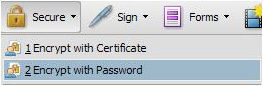
Step 1: Open your PDF file and select Encrypt with Password from the Secure icon on the Tasks toolbar.
Step 2: Select Restrict editing and printing of the document and enter a Permissions Password.
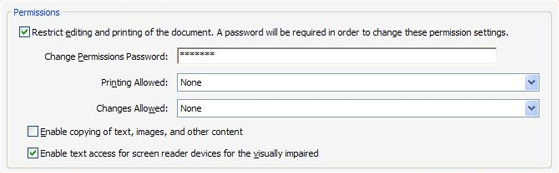
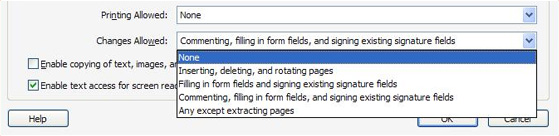
Step 3: Select the level of Printing Allowed and Changes Allowed.
Step 4: Click OK to save your document Permissions settings. You will be prompted to confirm the Permissions Password.
Products covered: |
Acrobat 9 |
Related topics: |
Protect PDFs |
Top Searches: |
Apply PDF passwords and permissions get electronic signatures from others sign and send documents |
Try Acrobat DC
Get started >
Learn how to
edit PDF.
Ask the Community

Post, discuss and be part of the Acrobat community.
Join now >
0 comments
Comments for this tutorial are now closed.
Comments for this tutorial are now closed.