


Looking for more help on How to Edit PDF?
- Consult the How to Edit interactive guide.
- Ask a question in our forum.
- You can leave a comment below for the author of this tutorial.
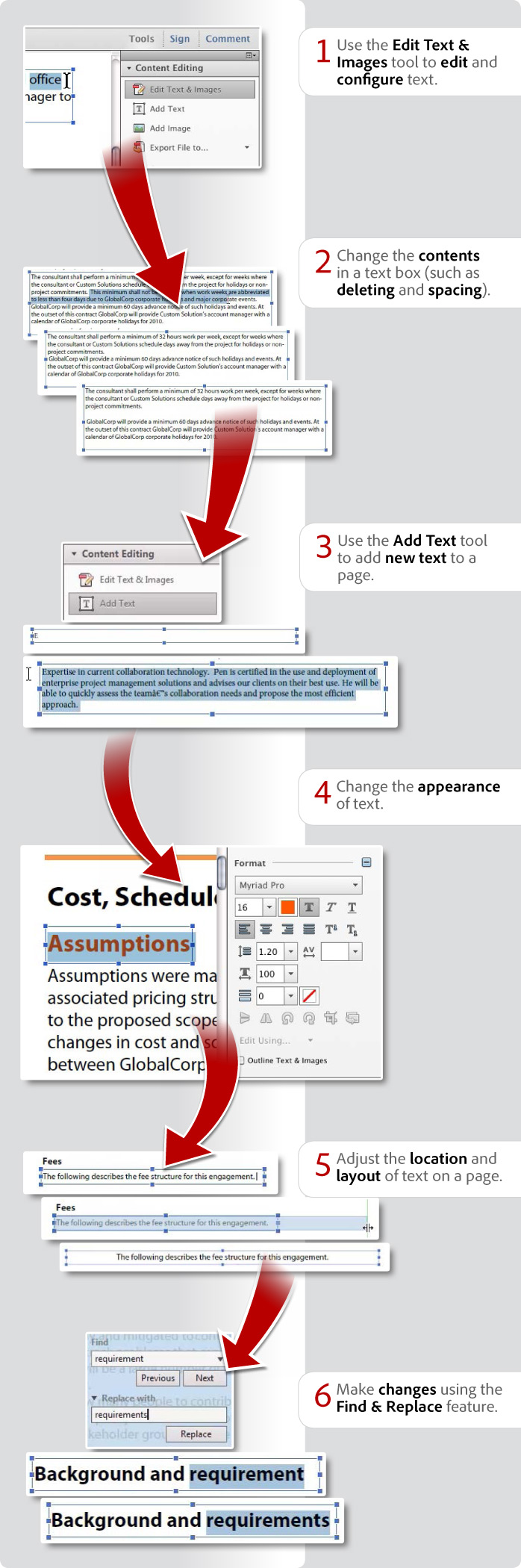
Donna Baker – September 22, 2012
Products covered: |
Acrobat XI |
Related topics: |
Edit PDFs |
Top Searches: |
Edit PDF files convert PDF to Word convert PDF to Excel convert PDF to PowerPoint Rearrange PDF pages Convert PDF to JPEG |
Try Acrobat DC
Get started >
Learn how to
edit PDF.

Post, discuss and be part of the Acrobat community.
Join now >
35 comments
Comments for this tutorial are now closed.
Lori Kassuba
3, 2015-03-26 26, 2015Hi Norihiko Murase,
The only way that you can edit text that has been run through OCR is to use the ClearScan option. This will synthesize the text with real fonts so that you can edit the text.
Thanks,
Lori
Norihiko Murase
8, 2015-03-19 19, 2015Hi Lori Kassuba,
Thank you very much for your comment!
I’ve read the document at the URL you kindly informed me of.
I consider the brief procedure of the method mentioned there is
as follows:
(1) Conduct OCR and obtain the “searchable text”.
(2) Create the PDF file that contains only this text.
(3) Overlay 2 files
1. Image only
2. Text only
using the system named “Layer”, and generate
ONE final PDF file.
However, it is NOT acceptable for me…
(#1)
Step (1) and (2) can be done indeed; however, this text is still now
invisible (the color of it is “none”/“transparent”). We must change
the color of it and get it visible; otherwise Acrobat does NOT recognise it
as text editable by means of “Edit Text & Images” tool.
* In that document, it seems that InDesign was used…
(#2)
Step (3) requires Acrobat Pro; Acrobat XI Standard does NOT have
the function of maintaining the layers, as far as I know.
Briefly, the following process HAS TO BE POSSIBLE anyhow:
* Change the color of the invisible (transparent) text
(the text that has NO COLOR)
Thanks,
Norihiko Murase
Lori Kassuba
9, 2015-03-12 12, 2015Hi Norihiko Murase,
Although the tutorial is old, check out the section on Recreate and insert a text layer at the bottom of this tutorial:
https://acrobatusers.com/tutorials/scanning-and-ocr-beyond-basics
You can use this technique to export the text, correct, and bring back into your file.
Thanks,
Lori
Norihiko Murase
5, 2015-03-10 10, 2015Hi,
I have one question…
Can I edit (correct) manually the wrong text on an invisible layer
over an image (for a PDF file applied OCR (optical character recognition) to)?
Unfortunately, in some cases, some of the text characters obtained via OCR
are wrong and NOT marked as suspect, so I would like to correct them manually.
I did try the method shown here; however I did FAIL with some error dialog…
How can I edit them?
* I use Acrobat XI Standard for Windows (11.0.10).
Thanks,
Norihiko
Lori Kassuba
8, 2015-02-20 20, 2015Hi Jeremy Ho,
You can only do this on a page-by-page basis in Acrobat. If you don’t have the original file, you might consider exporting to Word and changing the font there. But, this might not be the best alternative depending on the type of content you have in your PDF.
Thanks,
Lori
Jeremy Ho
4, 2015-02-20 20, 2015Please can someone tell me how to change the font of a pdf using Acrobat.
I have a 300 page pdf, and I need to change the font on ALL of them to Times New Roman.
However, Acrobat will only let me select everything on one page only, and I don’t have the time to do this for all 300 pages…..
Thanks
Lori Kassuba
2, 2014-10-30 30, 2014Hi tani,
You need to use Acrobat and not just the free Reader to edit a PDF file.
Thanks,
Lori
tani
10, 2014-10-28 28, 2014hello
there
thank to tell me abut editing ...but i can’t find any edit tools
Lori Kassuba
2, 2014-10-17 17, 2014Hi Atossa Shafaie,
If you have the Pro. version, you could use the Object Inspector in Acrobat to determine the exact color/font. This discussion has some background on the Object Inspector:
https://answers.acrobatusers.com/How-I-determine-dpi-photo-PDF-document-q162962.aspx
Thanks,
Lori
Atossa Shafaie
4, 2014-10-16 16, 2014Is there a way to match new text font and color to pre-existing text font and color in the rest of the document if using Adobe Photoshop?
Lori Kassuba
1, 2014-09-26 26, 2014Hi Bob,
You’ll want to use the another program to create the graphic and use the Add Image command under the Content Editing panel to include this in your existing PDF file.
Thanks,
Lori
Bob
7, 2014-09-24 24, 2014How do I make circle text and put in a circle section like on a patch in acrobat?
Lori Kassuba
6, 2014-07-28 28, 2014Hi T,
You don’t need anything but the free Reader version XI to type into a PDF form:
https://acrobatusers.com/tutorials/how-to-work-with-forms-in-adobe-reader-xi-infographic
Thanks,
Lori
T
2, 2014-07-28 28, 2014I find it apalling that I have to pay to be able to type into an online pdf form. For shame Adobe. For shame…
Lori Kassuba
4, 2014-07-03 03, 2014Hi Maria,
I would use either the Bates number feature (in Acrobat Pro.) or the Header & Footer command to add this on all your pages.
Thanks,
Lori
Maria
3, 2014-07-01 01, 2014How to enter the document number that has to appear on all 140 pages of document?
Lori Kassuba
6, 2014-03-05 05, 2014Hi Phil Leigh,
Feel free to post your suggestion here:
https://www.adobe.com/cfusion/mmform/index.cfm?name=wishform
Thanks,
Lori
Phil Leigh
1, 2014-03-03 03, 2014Adobe should be ashamed to have such confusing tutorials and even more ashamed to impose such complexity into editing dot-pdf document in Acrobat XI for Mac. My gosh it is the 11th version…you should have cut the complexity by 90%. .
Lori Kassuba
5, 2014-02-04 04, 2014Hi Jana McDonald,
It’s not possible to set the default for the font/size using the Edit Text & Images command in the Content Editing panel. You can only do this for the Add Text Comment command (previously called the typewriter tool) found under the Annotations panel.
Thanks,
Lori
Jana McDonald
4, 2014-01-29 29, 2014On the previous revisions of Acobe Pro I have been able to enter the Font and Size needed and it would lock in until I changed it. I am only able to lock it in for the PDF file i am working on at that time. When I close it out and open the next PDF file I have to reset the Font and Size again. How do you lock the Font and size to be used for more than one pdf file?
Lori Kassuba
5, 2014-01-21 21, 2014Hi Joe Silva,
If security on a PDF has been set to disallow changes, then it’s not possible to edit the file. However, if the security does allow you to add comments, then you can use the Add Text Comment tool (available in Acrobat or Reader XI) under the Comment pane to type information into the PDF file.
Thanks,
Lori
Joe Silva
3, 2014-01-17 17, 2014Is there a way to edit, or type in a locked PDF?
Rodelene
5, 2013-12-05 05, 2013Hi,
I have the pro xi ... and for a while I was able to edit the text and images using the content editing ...
Now I couldn’t do it anymore ...
I even did the acrobat repair installation ... and still nothing ...
A box now will pop-up saying that the document or document"s” has no editable text or scanned contents ...
Why is this happening now?
It was working fine previously ...
Please help!
Lori Kassuba
5, 2013-10-23 23, 2013Hi Madni Khan,
You need Acrobat (not the free Reader) to create a PDF document. Or, if you have the free Reader, you can subscribe to the online Adobe PDF Pack services to create a PDF from Reader. Here is a tutorial on how to do that:
https://acrobatusers.com/tutorials/how-to-edit-a-pdf-file-in-adobe-reader
Thanks,
Lori
Madni Khan
1, 2013-10-23 23, 2013I want to make a PDF Document where could edit but Really I don’t know how can I make that file (portable document file)
donna baker
6, 2013-07-15 15, 2013Hi Jaimie -
You must be using Acrobat, not Adobe Reader in order to have access to the Tools panel and commands.
donna.
donna baker
6, 2013-07-15 15, 2013Hi Olivia -
You’re welcome. If you are using Acrobat XI, you can use the Edit Text & Images tool, select paragraphs and change the color. However, you have to do that page by page.
donna.
Jaimie
9, 2013-07-10 10, 2013I cannot find the “Tool” besides “Share” and “Comments”. Also I cannot find “Content Editing” hence no “Edit Text and Images”.
My version is Adobe Reader X. Is there any setting or user profile problems, so my colleagues have such buttons and functions, while I do not?
Olivia Li
12, 2013-05-09 09, 2013Hi Donna,
Thanks so much for your fast response, and I just dont have the original document like word format, so I have to find a way to amend on the pdf. but still your answer is very helpful to me.
Thank you!
donna baker
4, 2013-05-06 06, 2013Hi Olivia -
You have to make the change on each page. There’s no way to make that change throughout the entire document at once.
If you have access to the original document, it’ll be much quicker to make the changes there, then reproduce the PDF document.
donna.
donna baker
4, 2013-05-06 06, 2013Hi Steven -
Can you go back to the source document and try to embed the fonts again there?
It may be an issue you need to repair. Choose Help > Repair Acrobat Installation and let the program evaluate the installed components and make corrections as necessary.
donna.
Olivia Li
10, 2013-05-05 05, 2013may i ask how to edit text on all pages in a pdf, if it has too many pages and too much time will be costed manually, and i only want to change the font color. thank you.
steven johnson
2, 2013-02-02 02, 2013Even after embedding I am still getting this pop up ‘the original font is not availble or can not be used Acrobat is using Minio Pro’, followed by font that doesn’t match my document. Is there a way I can use a font to match my document font when editing?
donna baker
6, 2013-01-28 28, 2013Hi Bonnie -
Use the Edit Text and Images tool to click the page and activate the tools and commands. Click over the right (or left) edge of the frame you want to wrap and drag toward the center. You’ll see text start to wrap. If you add more text, it’s going to wrap further, and you can drag the edge of the frame as needed to get the appearance you want.
donna.
donna baker
6, 2013-01-28 28, 2013Hi Kwessi -
Use the Edit Text and Images tool and click the page to activate the tool, and the Content Editing commands.
donna.
Bonnie
2, 2013-01-22 22, 2013How do I wrap text in the Adobe Pro XI?
Kwessi Paa Annor
7, 2012-12-17 17, 2012When I select text using the add text tool, it doesn’t activate the Format panel.
How do I go about activating the Format panel, just so I can edit the font type and color?
Thanks
James McKay
4, 2012-12-13 13, 2012Yep. I prefer the infographic.
Dimitri Munkirs
11, 2012-12-11 11, 2012I like the video better but still can’t get used to there being no sound in a live video.
Dimitri
Michelle Martin
5, 2012-12-03 03, 2012I like this infographic better than the video, but if the video had sound, I probably would prefer it.
Comments for this tutorial are now closed.