How to set up a shared review with Acrobat XI
Learn how to do a PDF review or document review using Acrobat XI.



In this infographic, learn how to do a PDF review or document review using either a network folder, web server folder, or SharePoint workspace (Windows only) in Acrobat XI.
View transcript
How to set up a shared review with Acrobat XI
Donna Baker – April 25, 2014
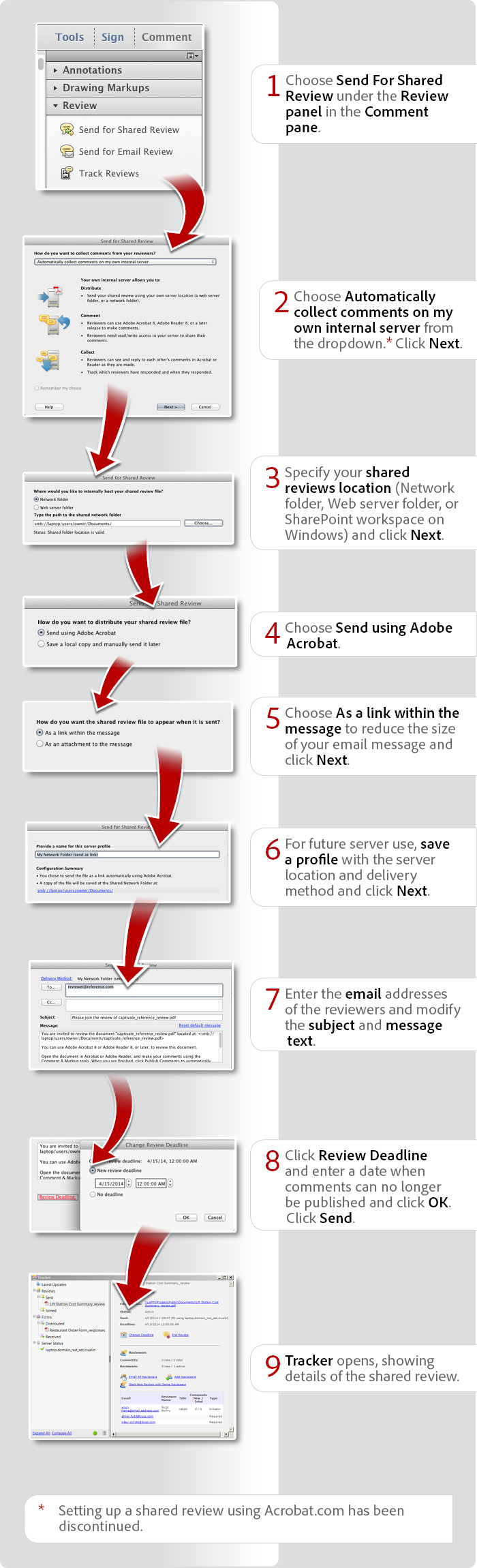
- Choose Send For Shared Review under the Review panel in the Comment pane.
- Choose Automatically collect comments on my own internal server from the dropdown.* Click Next.
- Specify your shared reviews location (Network folder, Web server folder, or SharePoint workspace on Windows) and click Next.
- Choose Send using Adobe Acrobat.
- Choose As a link within the message to reduce the size of your email message and click Next.
- For future server use, save a profile with the server location and delivery method and click Next.
- Enter the email addresses of the reviewers and modify the subject and message text.
- Click Review Deadline and enter a date when comments can no longer be published and click OK. Click Send.
- Tracker opens, showing details of the shared review.
* Setting up a shared review using Acrobat.com has been discontinued.
Products covered: |
Acrobat XI |
Related topics: |
Review and Comment |
Top Searches: |
Start a PDF review comment on your mobile device |
Try Acrobat DC
Get started >
Learn how to
edit PDF.
Ask the Community

Post, discuss and be part of the Acrobat community.
Join now >
7 comments
Comments for this tutorial are now closed.
Lori Kassuba
2, 2015-10-30 30, 2015Hi Brian,
You can go into Tracker (View > Tracker) to reset the deadline.
Thanks,
Lori
Brian
11, 2015-10-14 14, 2015Hi, On a shared review, the review has ended. How can I re-open this document for further shared review?
Thank you,
Brian
Lori Kassuba
6, 2015-07-14 14, 2015Hi Erik Terkelsen,
What version of Acrobat are you using? Do you have all the latest updates installed? Previously there was a syncing issue but it was fixed with the latest updates.
Thanks,
Lori
Lori Kassuba
6, 2015-07-14 14, 2015Hi EJ Rice,
I believe it had a lot to do with accessibility on mobile devices. The newer version of acrobat.com (cloud.acrobat.com) can easily be accessed on all sorts of devices but the older version could not.
Thanks,
Lori
Erik Terkelsen
11, 2015-07-06 06, 2015I have nine different PDF’s that were originally copies of the same PDF but with different language-layers active. I have flattened the layers and the files are renamed.
When I send one of these files for e-mail review, it works fine. However, if I try to send any of the other files, I get a message that I can’t since this file has already been sent for review.
It seems like all documents still refer to each other. I have tried to remove all metadata by saving an optimized PDF but I can’t get rid of this information.
Any ideas how to send each of these files with different languages for an e-mail based review?
EJ Rice
4, 2015-04-17 17, 2015Lori, thanks for letting me know. Do you know why Adobe discontinued the use of Acrobat.com? This seems like a real limitation for a lot of companies.
Lori Kassuba
4, 2015-04-17 17, 2015Hi EJ,
Unfortunately no. You can find more details about this here:
https://answers.acrobatusers.com/Does-Acrobat-Shared-Reviews-support-dropbox-q107123.aspx
Thanks,
Lori
EJ Rice
7, 2015-04-16 16, 2015Does a Dropbox folder count as a web server folder? My company, like a lot of modern startups I presume, doesn’t use shared servers.
Ahmed Naufal
11, 2014-12-20 20, 2014Thank you Lori, appriciated
Lori Kassuba
2, 2014-12-18 18, 2014Hi Ahmed Naufal,
There is an Action on the Exchange that can export comments to Excel but you’ll need the Pro. version to use it:
https://acrobatusers.com/assets/uploads/actions/Create_Comment_Summary.pdf
Thanks,
Lori
Ahmed Naufal
6, 2014-12-16 16, 2014Hi,
Its excellent, i want to know also how to export review comments into excel
Thanks
Ahmed
Lori Kassuba
5, 2014-10-31 31, 2014Hi doug,
Do this web folder support the webdav protocol? This blog has additional information on setting this up with a web folder:
http://blogs.adobe.com/acrolaw/2014/05/hosting-a-shared-review-an-alternative-to-acrobat-com/
The status information is found under View > Tracker and click on Reviews.
Thanks,
Lori
doug
8, 2014-10-29 29, 2014Unfortunately, you don’t mention how this works if one chooses to use their own Web server. No matter what I try, Adobe keeps stating, “The Shared Folder Location provided is not valid. Click OK and check the Status field for more information.”
I have tried several different web based folders and locations, all with full permissions.
BTW, where is this Status field? I don’t know what field Acrobat is referring to?
Lori Kassuba
4, 2014-07-07 07, 2014Hi Gonzalo Becerra,
Are you referring to how you go about incorporating all your comments back into the original document? If so, roundtripping is only possible with Word and AutoCad files. Here is a tutorial on how to do this with Word files:
https://acrobatusers.com/tutorials/how-roundtrip-comments-between-acrobat-and-word
Thanks,
Lori
Gonzalo Becerra
10, 2014-07-04 04, 2014Once the steps are performed, we will have a new file named _review.pdf right? once we already receive all the comments/review how can we proceed?
Comments for this tutorial are now closed.